Portfolio Website
Minimalist portfolio achieving perfect 100/100 Lighthouse scores, built with Astro.js/TypeScript. Key features include 10 dynamic color themes, full WCAG compliance, advanced Markdown (LaTeX/Mermaid.js) rendering, and a unique command-line interface for navigation.
- Side Project
- JavaScript
- TypeScript
- HTML
- CSS
- WCAG
- Astro.js
- Tailwind CSS
- Expressive Code
- Rehype
- Remark
Building the Ultimate Portfolio: Performance, Polish, and Power Features#
I believe a developer’s portfolio should be more than just a list of skills - it should be a demonstration of those skills in practice. That philosophy guided the creation of my personal website. Built on Astro.js and TypeScript, this side project became an exercise in pushing the boundaries of modern web development, focusing on performance, accessibility, and delightful user experience.
The Pillars: 100% on Lighthouse#
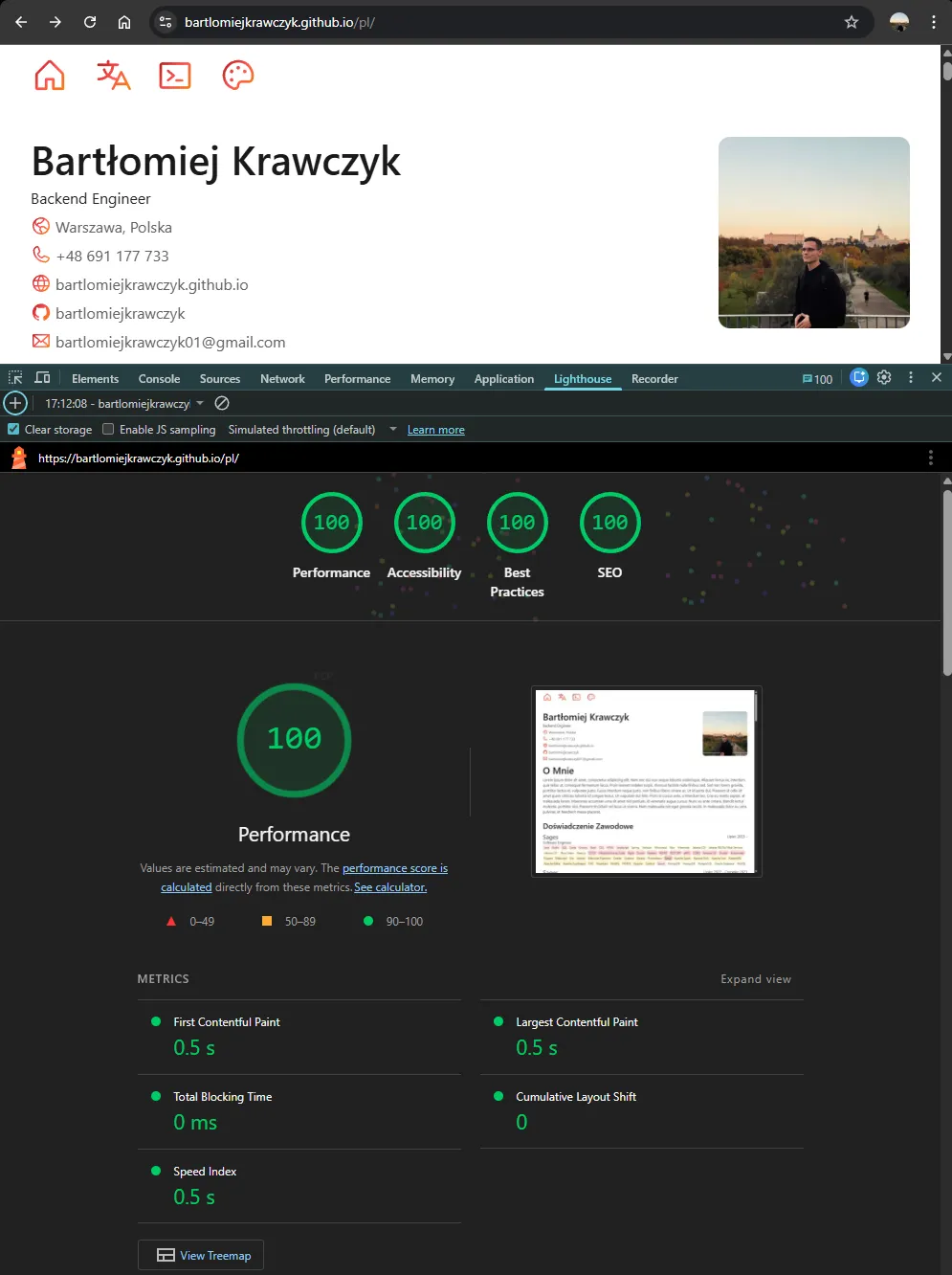
Achieving a perfect Lighthouse score across the board wasn’t just a goal; it was a commitment to best practices.
- 100/100 Performance
- 100/100 Accessibility (WCAG)
- 100/100 Best Practices
- 100/100 SEO
This required meticulous attention to detail, especially in optimization and adhering to the WCAG (Web Content Accessibility Guidelines). By embracing Astro.js’s default focus on speed and minimal JavaScript, coupled with Tailwind CSS for efficient styling, I ensured the site is blazing fast and lightweight, resulting in an optimal experience for every visitor.
The Feature Deep Dive#
Beyond raw metrics, the site is packed with features designed for maximum usability and developer showcase.
Dynamic Themes: Style on Demand#
To prevent design fatigue and show a deeper understanding of responsive and theming architecture, I implemented 10 distinct color schemes, all powered by pure CSS variables.
The architecture uses two primary states:
- Base Variables: Neutral grays and a core accent color.
- Dark Mode: An inverted set of grays applied using a media query, ensuring the theme dynamically adjusts based on the user’s system preferences.
- Theme Palettes: Individual root classes (
:root.theme-green,:root.theme-purple, etc.) override the primary and secondary color variables. This structure allows for easy expansion and maintains consistency across light and dark modes for every palette.
The Command-Line Interface (CLI) Terminal#
For users who prefer a rapid, keyboard-driven interface, I integrated a dynamic terminal overlay. Accessible via standard shortcuts (e.g., ESC or Ctrl + Shift + P), this feature demonstrates advanced frontend interaction and state management.
The terminal currently supports:
- Quick command filtering.
- Direct links to social media.
- “Modes” for filtering content, like project or tag filtering.
This is designed to mimic the efficiency of developer IDEs like VS Code, offering a powerful way to navigate complex content.
Content and Internationalization#
As a developer working in multiple environments, supporting different languages was key, as was ensuring the platform could handle diverse technical content.
Multi-Language Support#
The website is ready for both my native Polish and the primary content language, English. This internationalization capability is built directly into the routing and content structure, ensuring a seamless experience regardless of the user’s preferred language.
Robust Markdown and Technical Content#
Using Astro.js allows for beautiful, native support for Markdown, meeting the full GitHub Flavored Markdown (GFM) specification. To handle academic and technical content, I integrated powerful parsing tools:
- Rehype and Remark for processing and transforming Markdown.
- Support for rich features like dynamic table of contents and header links.
- Direct rendering of complex charts using Mermaid.js.
- Native support for mathematical syntax using LaTeX via MathJax/Katex, making it ideal for thesis and academic project documentation.
This portfolio is not just a resume; it’s a testament to the pursuit of high-quality, performant, and accessible software engineering.