Madrid Lidar Project
During a one-week course in Madrid, I combined technical learning with cultural exchange in an English-taught program. I developed a rotating lidar radar system using Arduino and Processing. The project explored real-time spatial measurement and interactive visualization.
Story#
During November 2024, I had the unique opportunity to travel from Poland to Madrid to participate in a one-week “ATHENS” course on physical computing at Universidad Politécnica de Madrid. This experience combined intensive hands-on technical learning with cultural insights, allowing me to deepen my knowledge in Arduino, Processing, and sensor-based prototyping while practicing English in an international academic setting.
Working in pairs, we were challenged to translate theoretical concepts into practical projects. My team decided to develop a rotating lidar radar system, exploring both hardware integration and software visualization. This project became the culmination of the course, pushing us to troubleshoot real-world electronics, implement serial communication protocols, and design an interactive graphical interface. Beyond technical skills, the experience enriched my problem-solving abilities, teamwork, and confidence in working within an international, multidisciplinary environment.
Idea#
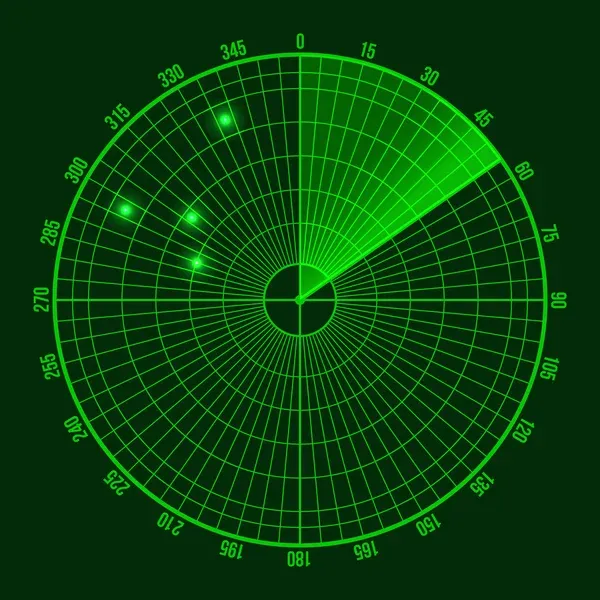
Our initial idea was to create a rotating lidar system designed to measure 2D spaces. The primary goal was to create a functional, simple, and visually appealing system capable of collecting spatial data and displaying it in an interactive graphical user interface, that would be heavily inspired by systems that look like this:
Implementation#
High-level overview#
We have decided to break the system into 2 main parts: the GUI would run on a PC, and the radar would be controlled by a microcontroller. Communication between the 2 components would be accomplished using a serial connection over USB. Using a USB connection to the microcontroller also automatically provides power to the microcontroller.
Microcontroller component#
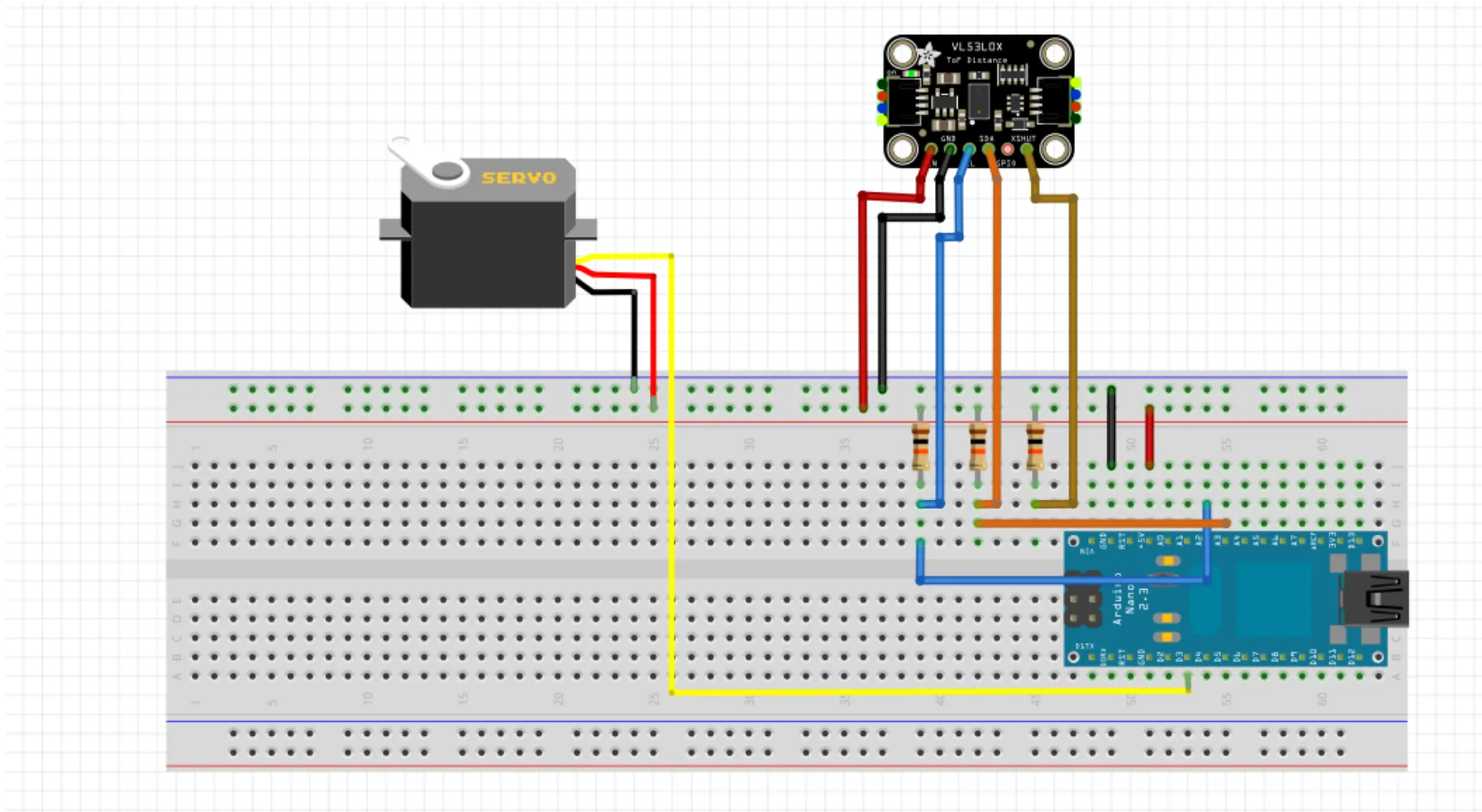
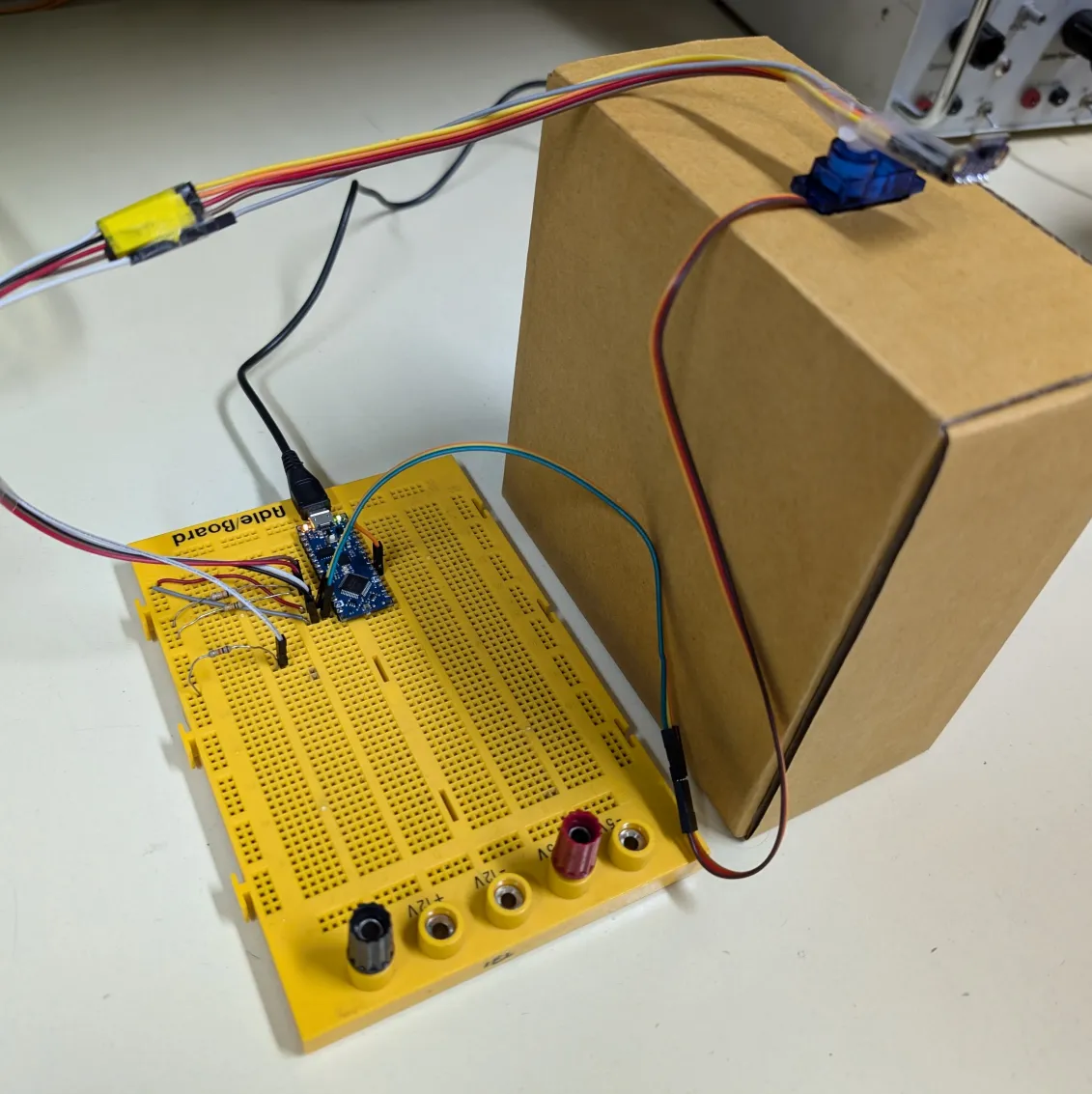
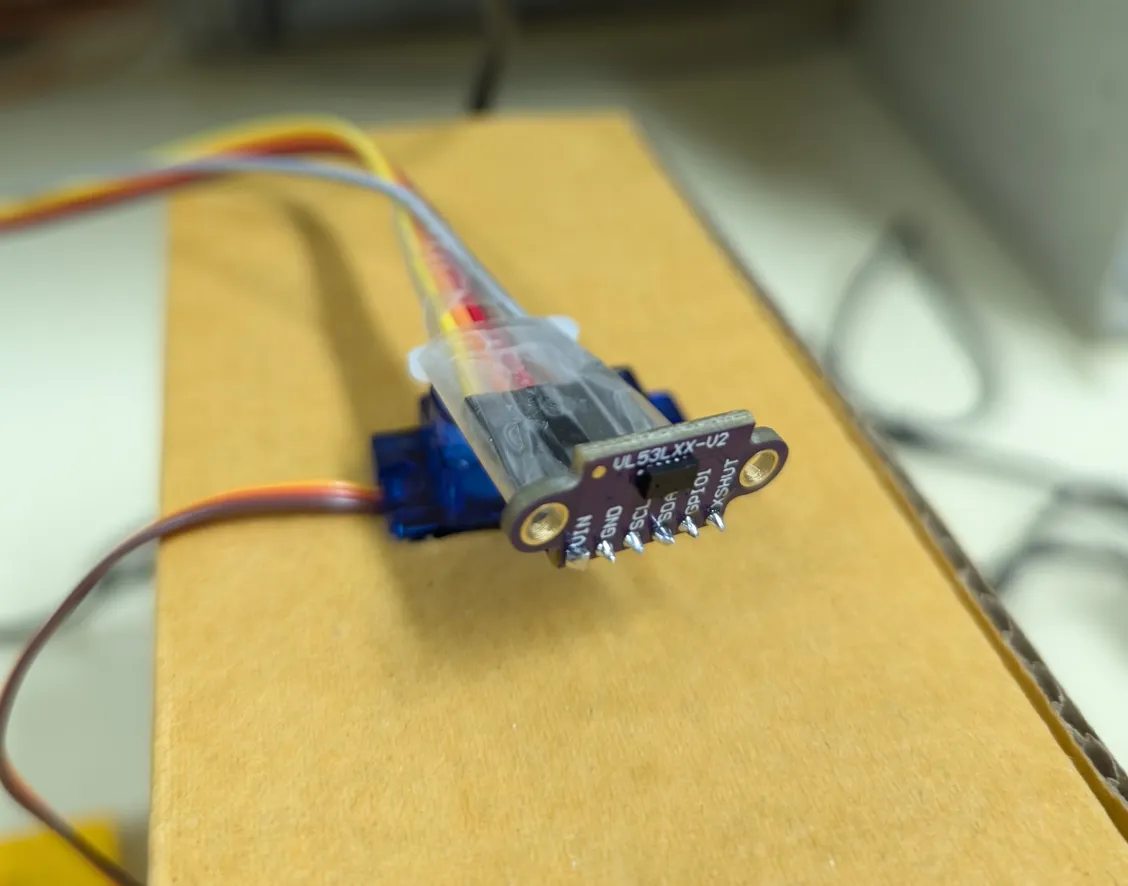
For the microcontroller component, we have decided to use the Arduino Nano Every board, as we have used it in the course introduction, and we should not need anything more powerful for our components. To implement the radar we have decided to use two components: a lidar time-of-flight distance sensor mounted on a servo motor. This allows us to take distance measurements at different angles. The microcontroller waits for the GUI to request an angle at which to take a measurement, it rotates the servo to the desired position and takes a distance reading. To drive the components we are using common libraries available for the Arduino ecosystem: Adafruit VL53L0X for the lidar sensor and Servo for the servo motor.
Encountered issues#
There were a couple of issues with the microcontroller implementation. Initially, we have left the XSHUT pin of the lidar sensor unconnected, which has caused the sensor to randomly reboot. We have later realized that XSHUT needs to be tied high (through a resistor); who would have thought that we have to ensure that the shutdown signal is not floating. At the beginning, we were using the “single reading” mode of the VL53L0X sensor. It gave more-or-less correct values, but measurements out of range would take very long time to complete. We have then switched to the “continuous” mode of the lidar, which solved the timing problem, but first readings returned by the library were completely wrong. Therefore, we are taking two distance measurements and simply discarding the first one. We have not encountered any big issues with the servo motor. Our main issue with the microcontroller was the Arduino board itself. It kept randomly crashing without any explicit reason, the lidar sensor would fail to initialize. We have added pull-up resistors to the I2C lines (from our previous experiences they usually were not necessary), reduced the baud rate of the serial connection, started connecting our laptops to chargers to ensure more power is available, and even replaced the Arduino board at some point, to no avail. In the end we have deleted all our Arduino code and rewrote it from scratch. This seemed to help, but the board still crashes, although very rarely.
Final result#
PC component#
The UI program displays the distance measurements as properly-scaled lines on a half-circle (the servo mechanism range is 180 degrees).
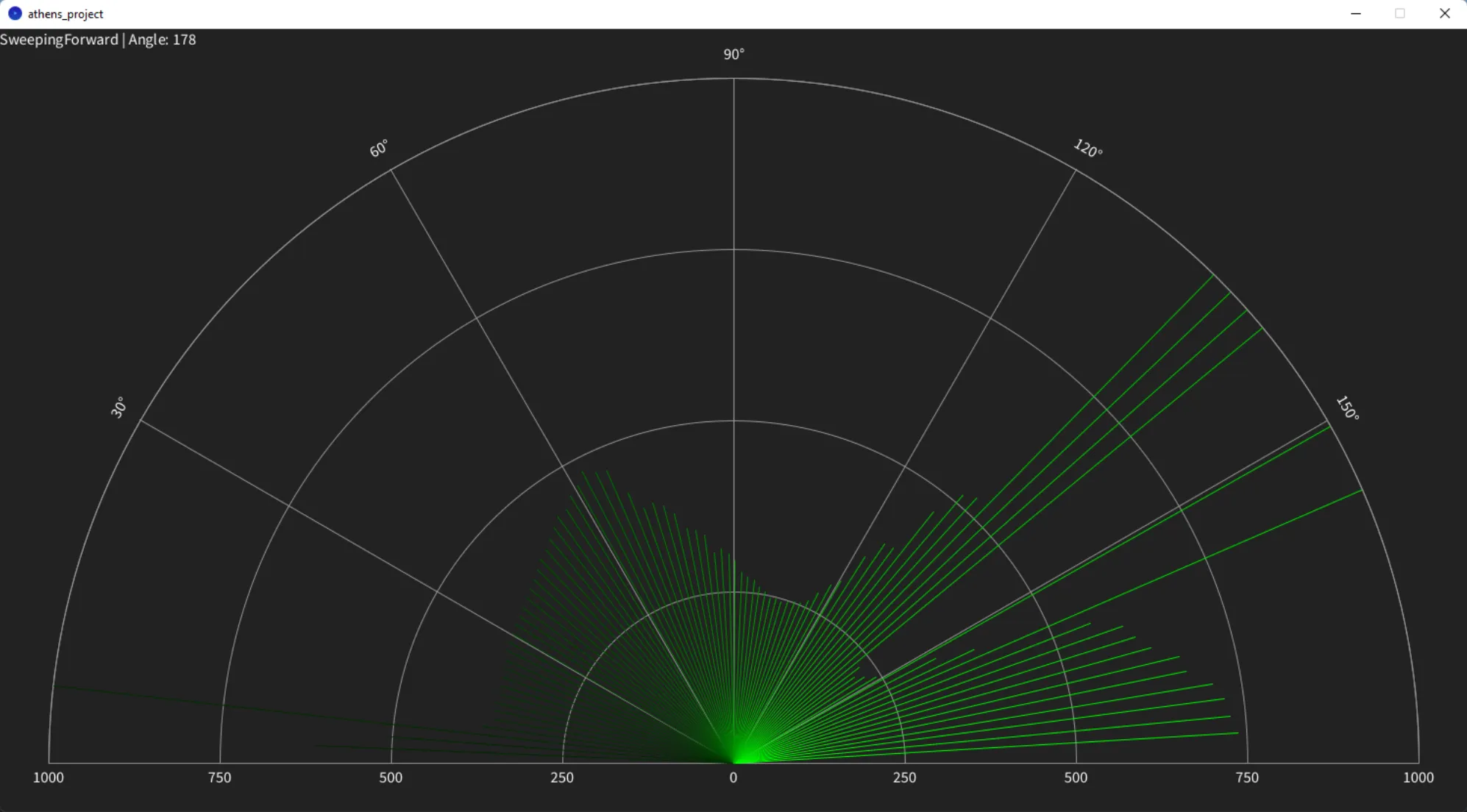
Older readings are faded dynamically, and they appear dimmer. The GUI starts sweeping the radar back and forth, but there is also a manual mode available. Pressing space toggles between automatic sweeping and manual control. In manual mode, the user can press left and right arrows to manually move the servo left and right. The GUI is written in Processing. As we have developed the GUI and microcontroller parts simultaneously, we have used more advanced features of the language. The microcontroller connection is abstracted into an interface, with 2 implementations: one which actually communicates with the Arduino and one which fakes any reading, for prototyping. Other than that, we have not encountered major issues with the implementation, as Processing is a straightforward language.
PC-Microcontroller communications#
The protocol over Serial is pretty straightforward. The GUI sends the angle plus one and in ASCII followed by
a newline, and then the microcontroller sends the actual angle (in ASCII), space and the measured distance in
mm (also in ASCII), followed by a newline.
The plus one comes from a peculiarity of Arduino’s Serial.parseInt(). This function returns 0 on failure, and we
need to be able to distinguish error conditions from “rotate to zero degrees” command, hence the plus one; the
microcontroller simply reads Serial.parseInt() - 1, thus error conditions can be easily detected as negative
requests.
Conclusion#
We were able to accomplish what we have set out at the beginning of the project, even if we have encountered a lot of issues during the implementation. The two components successfully display distance measurements.
Code#
Microcontroller#
#include <Adafruit_VL53L0X.h>#include <Servo.h>
Adafruit_VL53L0X distance_sensor = {};Servo servo = {};
int current_angle = 0;constexpr pin_size_t servo_pin = 3;constexpr int servo_ms_per_deg = 3;
void init_distance_sensor() { if (!distance_sensor.begin()) { Serial.println(F("# distance sensor failed to initialize")); while (1); } distance_sensor.setMeasurementTimingBudgetMicroSeconds(200000); distance_sensor.startRangeContinuous();}
unsigned int read_from_distance_sensor() { while (!distance_sensor.isRangeComplete()) { delayMicroseconds(100); } return distance_sensor.readRange();}
void init_servo() { servo.attach(servo_pin); servo.write(90); current_angle = 90; delay(180 * servo_ms_per_deg);}
void move_servo(int new_angle) { int angle_delta = abs(new_angle - current_angle); servo.write(new_angle); delay(angle_delta * servo_ms_per_deg); current_angle = new_angle;}
void setup() { // Initialize serial connection Serial.begin(9600); while (!Serial) delay(10); init_distance_sensor(); init_servo(); // Write on serial that initialization is done Serial.println(F("# initialization completed")); Serial.flush(); pinMode(LED_BUILTIN, OUTPUT); digitalWrite(LED_BUILTIN, HIGH);}
void loop() { // Try to read a requested angle from serial. // As `parseInt` returns 0 on timeout/invalid values, // the user sends (angle + 1). int angle = Serial.parseInt(SKIP_WHITESPACE) - 1; if (angle >= 0 && angle <= 179) { move_servo(179 - angle); (void)read_from_distance_sensor(); // The first readout is not accurate, ignore it unsigned int distance_mm = read_from_distance_sensor(); 5 Serial.print(angle); Serial.print(' '); Serial.println(distance_mm); Serial.flush(); }}GUI#
import java.util.Map;import processing.serial.*;
int old_readout_ms = 18000;int window_width = 1500;int window_height = 800;int radar_radius = 700;int radar_root_x = window_width / 2;int radar_root_y = window_height - 50;int angle_step = 2;int text_offset_x = 0;int text_offset_y = 20;int manual_direction = 0;
class Readout { public int angle; public int distance_mm; public int capture_ms;
Readout(int angle, int distance_mm) { this.angle = angle; this.distance_mm = distance_mm; this.capture_ms = millis(); }
boolean is_old() { return (millis() - capture_ms) > old_readout_ms; }}
interface RadarController { void start_readout(int readout);
Readout get_readout();}
class SerialRadarController implements RadarController { Serial serial_port;
SerialRadarController(PApplet parent) { var port = Serial.list()[0]; println("Port: " + port); serial_port = new Serial(parent, port, 9600); }
void start_readout(int new_angle) { angle = new_angle; serial_port.write((angle + 1) + "\n"); }
Readout get_readout() { while (serial_port.available() > 0) { 6 String readout = serial_port.readStringUntil(0xA); if (readout == null || readout.charAt(0) == '#') return null; String[] parts = split(trim(readout), ' '); int angle = int(parts[0]); int distance_mm = int(parts[1]); return new Readout(angle, distance_mm); } return null; }}
class FakeRadarController implements RadarController { int angle = 0; int request_time = 0; boolean pending = false;
FakeRadarController() { }
void start_readout(int new_angle) { angle = new_angle; request_time = millis(); pending = true; }
Readout get_readout() { if (!pending || (millis() - request_time) < 100) return null; pending = false; return new Readout(angle, int(random(100, 1000))); }}
enum Status { SweepingForward, SweepingBackward, Manual,}
Status status = Status.SweepingForward;RadarController radar;HashMap<Integer, Readout> readouts;int angle;
void setup() { size(1500, 800); randomSeed(millis() % 256); status = Status.SweepingForward; // radar = new FakeRadarController(); radar = new SerialRadarController(this); readouts = new HashMap<Integer, Readout>(); angle = 0; delay(500); radar.start_readout(angle);}
void draw() { // Check if a readout is available Readout pending_readout = radar.get_readout(); if (pending_readout != null) { 7 readouts.put(pending_readout.angle, pending_readout); // Advance the angle, depending on current status switch (status) { case SweepingForward: angle += angle_step; if (angle >= 179) { status = Status.SweepingBackward; angle -= angle_step; angle -= angle_step; } break; case SweepingBackward: angle -= angle_step; if (angle <= 0) { status = Status.SweepingForward; angle += angle_step; angle += angle_step; } break; case Manual: angle += manual_direction; if (angle >= 179) { angle = 179; } else if (angle <= 0) { angle = 0; } break; } radar.start_readout(angle); } // Draw the UI background(#222222); stroke(#ffffff); noFill(); textAlign(LEFT); textSize(16); text(status.toString() + " | Angle: " + angle, 0, 16); stroke(#999999); arc( radar_root_x, radar_root_y, 2 * radar_radius, 2 * radar_radius, PI, TWO_PI); line( radar_root_x - radar_radius, radar_root_y, radar_root_x + radar_radius, radar_root_y); textAlign(CENTER); text("0", radar_root_x + text_offset_x, radar_root_y + text_offset_y); drawDistanceScale(1000); drawDistanceScale(750); drawDistanceScale(500); drawDistanceScale(250); 8 drawDegreeScale(150); drawDegreeScale(120); drawDegreeScale(90); drawDegreeScale(60); drawDegreeScale(30); int now = millis(); for (Readout readout : readouts.values()) { if (readout.is_old()) continue; float angle_rad = radians(float(readout.angle) + 0.5); float distance_px = map( constrain(readout.distance_mm, 0, 1000), 0, 1000, 0, radar_radius); int x = int(-distance_px * cos(angle_rad)) + radar_root_x; int y = int(-distance_px * sin(angle_rad)) + radar_root_y; int grey = int(map( float(now - readout.capture_ms), 0, old_readout_ms, 255, 34)); stroke(0, grey, 0); line(radar_root_x, radar_root_y, x, y); }}
void keyPressed() { if (key == ' ') { if (status == Status.Manual) { status = Status.SweepingForward; } else { status = Status.Manual; } } else if (key == CODED) { if (keyCode == LEFT) { manual_direction = -angle_step; } else if (keyCode == RIGHT) { manual_direction = angle_step; } }}
void keyReleased() { manual_direction = 0;}
void drawDistanceScale(int distance) { textAlign(CENTER); var offset = (distance / 1000.0) * radar_radius; text( String.valueOf(distance), radar_root_x + text_offset_x - offset, radar_root_y + text_offset_y); text( String.valueOf(distance), radar_root_x + text_offset_x + offset, 9 radar_root_y + text_offset_y); arc(radar_root_x, radar_root_y, 2 * offset, 2 * offset, PI, TWO_PI);}
void drawDegreeScale(int degrees) { pushMatrix(); translate(radar_root_x, radar_root_y); rotate(PI / 2 + degrees / 180.0 * PI); line(0, 0, 0, radar_radius); popMatrix(); pushMatrix(); translate(radar_root_x, radar_root_y); rotate(-PI / 2 + degrees / 180.0 * PI); text(String.valueOf(degrees) + "°", 0 - text_offset_x, -radar_radius - text_offset_y); popMatrix();}